How to crack forgotten Outlook passwords for accounts and PST/OST files
Recovery Toolbox for Outlook Password
Recovery Toolbox for Outlook Password helps to crack, reset, remove, retrieve, show forgotten Microsoft Outlook passwords for accounts, PST and OST files
Recovery Toolbox for Outlook Password designed for:
Retrieval of passwords from Microsoft Outlook email accounts
To recover and show passwords from .pst files
To crack passwords from .ost files
To reset passwords from .pst files
To remove passwords from .ost files
Backup of Outlook account settings
To show the settings of all Microsoft Outlook accounts
To display the settings of all Windows Mail profiles
Microsoft Outlook Password Recovery Tool
The features of the MS Outlook PST password cracker tool include:
Instant MS Outlook password recovering
A clear, simple user-friendly interface based on a step-by-step wizard
Support for all versions of Microsoft Outlook (97/98/2000/XP/2003/2007/2010/2013/2016/2019/2021/2024)
Fast password cracking for the following types of mail accounts:
Microsoft Exchange Server
POP3/SMTP email servers
IMAP mail servers
HTML mail servers (e.g., Gmail, Yahoo, Hotmail, and MSN)
Microsoft LDAP Directory
Microsoft Mail
Outlook.com, HotMail, Yahoo, MSN, AOL, etc.
ActiveSync
Gmail
And much more
Extract of passwords for PST files (ANSI and Unicode versions)
Fast cracking of passwords for OST files (ANSI and Unicode versions) of any size created in any version of Outlook or Microsoft Exchange Server
Resetting of passwords for PST files
Password removal from OST files
Saving of Outlook settings to a text file with cracked passwords
Hacking of passwords for accounts and files for each user's login
Retrieval of lost passwords for each Outlook Mail profile
Support of password breaking over a LAN, from CD and DVD discs, USB drives, and other removable drives and media
Restoration of forgotten multi-language passwords (including Latin, European, Cyrillic or hieroglyphs)
View and find forgotten passwords
Full Install/Uninstall support
In Recovery Toolbox for Outlook Password you can see passwords immediately after running the software. The Outlook Password Recovery Tool reads the PC and works as a viewer for lost passwords. The software also functions as a password remover for PST files.
If you want to reset password for PST or OST file of Microsoft Outlook then follow next steps:
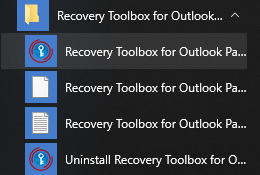
Run Recovery Toolbox for Outlook Password
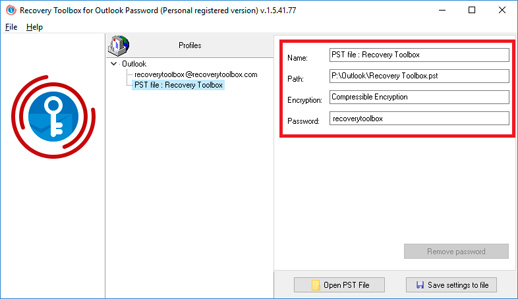
Click on PST file in left panel
Click on Remove password button in right panel
Outlook password reset function works very fast and easy with the Outlook password revealer software.
How to retrieve Outlook passwords and show all MS Outlook pwd. If you want to view pass for accounts and Personal Store Folders in Microsoft Outlook then use special Outlook password decryptor: Recovery Toolbox for Outlook Password. This is special Outlook password viewer tool for all versions of Windows.
How to view Outlook password
How to see saved password in Outlook:
Run Recovery Toolbox for Outlook Password
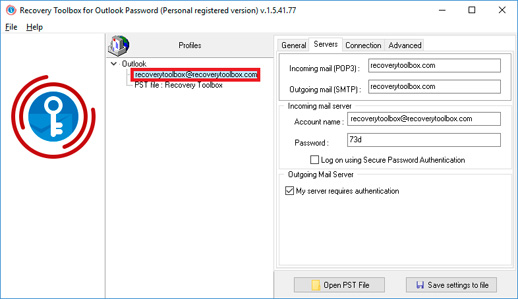
Click on account in left panel
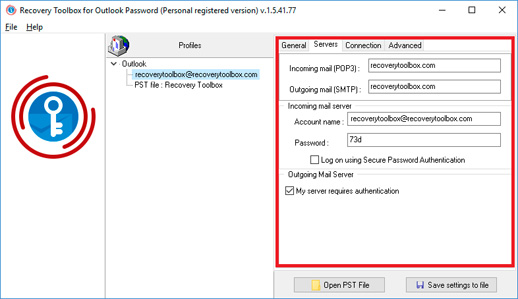
View account password for account in right panel
Or
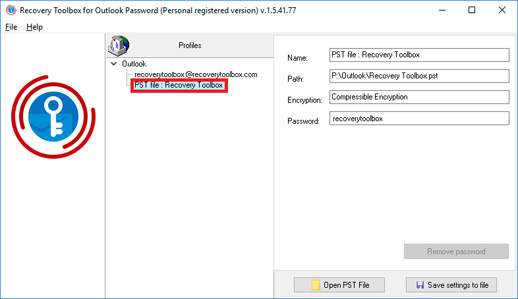
Click on PST file in left panel
View file password for account in right side
Recovery Toolbox for Outlook Password recover password from Outlook immediately or very fast.
Notes:
Recovery Toolbox for Outlook Password does not recover passwords from email accounts if Microsoft Outlook was installed on a new computer or reinstalled. In this case, all email account details, including passwords, are removed from the system.
Demo version limitation: The unregistered version of Recovery Toolbox for Outlook Password displays only the first three characters of the password being recovered. The registered version of the program can restore the entire password without any limitation. You can purchase the full version of the program on the purchase page.
Requirements:
Windows 98/Me/2000/XP/Vista/7/8/10/11 or Windows Server 2003/2008/2012/2016 and above
By clicking Download or Repair Online, you agree to the Terms of Service and EULA.
Recovery Toolbox for Outlook Password
Video:
Online help:
Recovery Toolbox for Outlook Password (Download) visualizes detailed information about the mail accounts and passwords of the Microsoft Outlook mail client.
Once started, Recovery Toolbox for Outlook Password reads all the information necessary for recovery and instantly decrypts it. The right part of the program window contains the recovered passwords and the account and Microsoft service settings the Microsoft Outlook uses in its work. Thus, the process of recovering forgotten or lost passwords in Recovery Toolbox for Outlook Password is completely automated and comes down to starting the program.
For your convenience, Recovery Toolbox for Outlook Password can save the configuration of Microsoft Outlook profiles to a separate text file. To do it, you should select the Save settings to file item in the File menu and click the Save settings to file button in the lower part of the Recovery Toolbox for Outlook Password window. The program will offer you to select the path for saving the text file and specify the name of the file. Click the Save button after you specify the data.
Recovery Toolbox for Outlook Password also recovers forgotten or lost passwords for the .pst files. The Microsoft Outlook mail client saves personal user data (contacts, messages, reminders, tasks and notes) to these files. The process of recovering the password for the *.pst file of the current user is started with selecting the corresponding item in the left panel of the Recovery Toolbox for Outlook Password program. The right part of the program window will display the path to the *.pst data file and its password.
Note: Passwords for *.pst files may be differ from passwords used before. Nevertheless, passwords obtained with Recovery Toolbox for Outlook Password will provide access to personal data stored in .pst files and protected with a password.
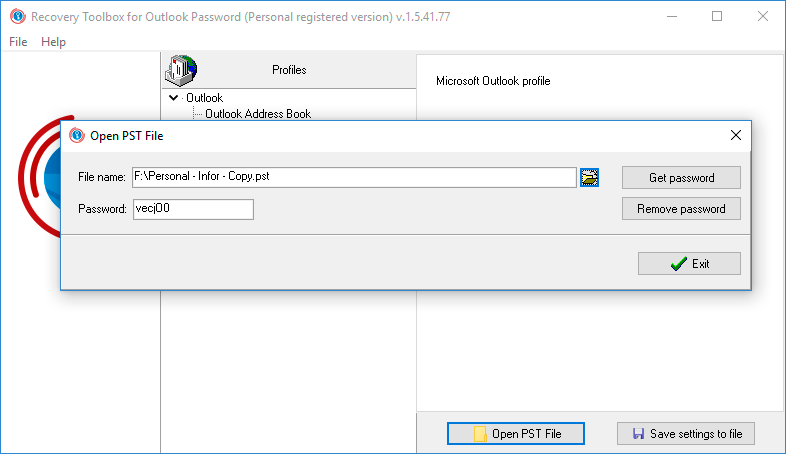
Also, it is possible to recover the password for an *.pst files that is not used by the current configuration of the Microsoft Outlook mail client. To recover the password for such a *.pst file, you should specify the path to it in Recovery Toolbox for Outlook Password. To do it, click the Open PST file button in the lower part of the program window or select the Open PST file item in the File menu. Use the dialog box to select the *.pst file you want to recover the password for. After you select the file, click the Get Password button. The password will be immediately recovered. After the password is recovered, you can copy it to the clipboard using the Ctrl+C key combination and insert it using the Ctrl+V key combination in any other document you need.
It is possible to use Recovery Toolbox for Outlook Password to view the data and settings of the Microsoft Outlook mail client for several profiles of the current user. In case you need to recover the data of another user on this computer, restart the Windows operating system using the accounts of the user whose data you want to recover.
An email with a registration code and instructions for activating this code will be sent to the user immediately after the payment confirmation.
An email with a registration code will be sent from several different mail servers to prevent messages from appearing in SPAM filters. Accordingly, a possible duplication of registration letters received in the user's mailbox.
To activate the registration code, you need to run the application in Windows under a user with Administrator rights.
The number of Personal, Business or Site licenses activated simultaneously must not exceed the number of purchased licenses.
We sell software via registration services PayPro Global and Noventiq. That is why not Recovery Toolbox, but the corresponding company will be specified in the payment documents.
The purchased registration key is valid for all 1.x versions of Recovery Toolbox for Outlook Password.
While the free DEMO version of Recovery Toolbox for Outlook Password might help diagnose the possibility of password recovery, the full version offers significant advantages for recovering forgotten passwords on your Outlook email accounts and PST files:
Complete Data Recovery: Unlike the free DEMO version, which may only show recoverable data, the full version allows you to take action. You can restore the password information you retrieved in a usable format for your Outlook application.
Increased Success: The full version boasts a higher recovery rate than the free version, giving you a better chance of regaining access to your forgotten passwords.
In simpler terms, the free DEMO version can identify recoverable passwords, but the full version allows you to unlock and use them within Outlook. It can be crucial for accessing important emails and data stored in your Outlook account.
The benefits you get by upgrading from the free DEMO to the full paid version
Unlocking Functionality:
Password Reveal: The free version only shows you the first three characters of the recovered password. It might need more to guess the entire password, especially for complex ones. The full version unveils the complete password, allowing you to regain immediate access to your Outlook account or PST file.
Enhanced Recovery Potential:
Advanced Recovery Methods: The full version might employ more sophisticated password recovery techniques than the free DEMO. It can significantly increase the success rate, especially for passwords with complex structures or those lost for extended periods.
Dictionary Attack Customization: The full version might offer customization options for dictionary attacks, a typical password recovery method. You can include custom dictionaries containing terms or phrases relevant to your password creation habits, further improving the chances of recovery.
Peace of Mind:
Guaranteed Functionality: While the free DEMO version might offer limited functionality with no guarantee of success, the full version is a paid product focusing on delivering results. It can provide peace of mind as you invest in a solution specifically for password recovery.
Important Note:
It's important to remember that even the full version might not guarantee 100% password recovery success, especially for very complex passwords or those with significant data corruption. However, it offers significantly improved chances compared to the free version.
Upgrades:
Before upgrading, consider the complexity of your forgotten password and the importance of the data locked within the Outlook account or PST file. The free version might suffice if the password is relatively simple and the data isn't critical. However, the full version, with its enhanced recovery capabilities, can be a worthwhile investment for more complex scenarios or crucial data.
How to remove forgotten password from .PST file in Microsoft Outlook
Answer:
First variant of password reset from .pst file:
Open Recovery Toolbox for Outlook Password.
Click on the Open PST file button in the bottom-right corner.
Select a .pst file from HDD in the first field.
Press Get password button. Moments later, you'll see a recovered password in the Password field.
Press the Remove password button.
Close our software.
Open the .pst file in Outlook (no password is needed).
Second variant of password breaking:
Execute steps 1-4 from the first variant.
Select a password (press Ctrl+A) and copy it into Clipboard (press Ctrl+C).
Close Recovery Toolbox for Outlook Password.
Open Microsoft Outlook.
Open the password-protected .pst file.
Select this Personal Store Folder in the left panel.
Right-click the mouse.
Select a Data file properties… item.
Click on the Advanced tab.
Click on the Change password button.
Paste the recovered password (press Ctrl+V) but keep any new password field empty.
Press the OK button.
Question:
Incorrect symbols in password for PST file
The cracked password for a PST file does not resemble the old password. The Recovery Toolbox for Outlook Password has found a password for a PST file and shown the first 3 characters that did not appear in the original password.
Answer:
A password for a PST file resembles the original password.
The Recovery Toolbox for Outlook Password may recover a password for a PST file that is not be identical to the original. However, the password will still work. The user will be able to use it to open PST files without limitation.
Such situations occur under the following conditions:
the user's password contained non-Latin characters
the user's password was too long
Once Microsoft Outlook has opened a password-protected PST file, the user can change the password to one that is shorter and easier to remember.
Note: this article does not apply to passwords for Microsoft Outlook email accounts found by the Recovery Toolbox for Outlook Password. Recovered passwords for email accounts must match their originals exactly.
Question:
You entered the correct password in the Outlook settings for the PST file, but sometimes when accessing the PST file Microsoft Outlook requests you enter the password again
Answer:
In this case, you need to run an integrity check on the hard disk (HDD). It is possible that sectors and/or blocks on the disk, where the PST file is located, are damaged.
To check the integrity of the disk you have to:
Open Windows Explorer
Select the disk where the PST file resides
Press the right mouse button
Select the Properties option
Select the Tools tab
Press the Check now... button
Place checkmarks on the following:
Automatically fix system errors
Scan for and attempt recovery of bad sectors
Press the Start button
Follow the instructions
Question:
How to reset the password of a Microsoft Outlook PST file
Answer:
Step-by-step instructions on how to clear a password from an Outlook PST or OST file:
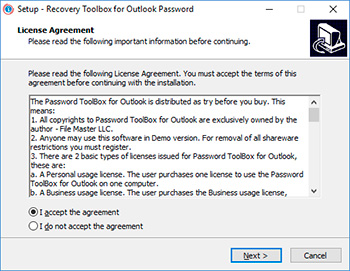
Download and install Recovery Toolbox for Outlook Password
Run Recovery Toolbox for Outlook Password
Click on the Open PST File button on the right bottom corner
Select *.pst file in first field
Press Remove password button
Question:
Not restored password for .pst file. What to do?
I have a personal registered Recovery Toolbox for Outlook Password purchased and installed w/o any hassle today. The reason for the purchase was two .pst files with missing password. One is easily and instantly recovered using the new program. However, the other is not. Nothing is displayed in the password window. It's empty. No error message. Could you kindly advice?
Answer:
The most probable cause is a damage in the PST file. In rare cases, the password area of a PST file could be damaged, causing Outlook to keep promptting you for the password, which can not be accepted. You can repair the damaged PST file using the Recovery Toolbox for Outlook utility.
Question:
How to break the password for an Exchange Server mail account?
Answer:
When using Outlook with an Exchange Server email account, authorization is mostly performed with the help of Windows Domain Controller. This way, the standard Windows and local domain password is used for authorization in Windows Domain and other services, including Microsoft Outlook and Microsoft Exchange Server.
Recovery Toolbox for Outlook Password does not break passwords that are Windows user passwords.
Question:
Does Recovery Toolbox for Outlook Password work with corporate Exchange accounts?
Answer:
No. Microsoft Exchange uses Windows Domain authentication.
Question:
Can I recover a password if Outlook is connected via VPN?
Answer:
Yes. Passwords for Outlook accounts and PST files are stored locally, and VPN does not prevent password decryption.
Question:
Does the program support Office 365 accounts?
Answer:
No. You will need to contact Microsoft online support to resolve issues with Office 365 accounts.
Question:
Is there a portable version of the program that can be run without installation?
Answer:
No.
Question:
What should I do if Recovery Toolbox for Outlook Password does not recognize my Outlook profile?
Answer:
In this case, it will not be possible to read the account and password for the Outlook account. However, it will be possible to read the PST file. Simply specify the location of the PST file to the program in order to crack the password for the file.
Question:
What should I do if my antivirus program blocks the program?
Answer:
You need to add Recovery Toolbox for Outlook Password and the folder where the PST file is located to the antivirus program's exceptions list.
Question:
How can I avoid being asked for the Outlook password again after it has been recovered by the program?
Answer:
Simply reset the password for the PST file in the Personal Store Folder properties.
Question:
Can problems arise when the program works with encrypted PST files?
Answer:
No. The program reads encrypted PST files on the fly.
Question:
Does the program save the recovered passwords anywhere?
Answer:
No. Recovery Toolbox for Outlook Password does not save or copy the recovered passwords anywhere. However, the user can save all Microsoft Outlook account settings, including passwords, to a text file.
Question:
Is it safe to use the program on public computers?
Answer:
Yes.
Question:
What steps should be taken after successfully recovering a password to prevent it from being leaked?
Answer:
The recovered password must be stored in a secure location.
Question:
Does Recovery Toolbox transfer data to the developer's servers?
Answer:
No. Recovery Toolbox for Outlook Password does not transfer any data anywhere. The program works completely autonomously.
Question:
Can someone access my data if I give the license key to third parties?
Answer:
No. Recovery Toolbox for Outlook Password does not exchange data with third parties.
Question:
Can I purchase a license using cryptocurrency?
Answer:
No.
Question:
How quickly is the license activated after payment?
Answer:
The registration key for Recovery Toolbox for Outlook Password is provided to the user immediately after payment confirmation. Next, to activate the program, you need to enter the registration key in a special form in the program and restart Recovery Toolbox for Outlook Password.
Question:
If I lose my license key, can I recover it for free?
Answer:
Yes. You need to contact technical support to have the registration letter resent. Please provide your email address or order ID.
Question:
Are there any discounts when purchasing licenses for multiple computers?
Answer:
For companies, there is a convenient Local License for activating up to 100 computers.
Question:
Can Recovery Toolbox be used on virtual machines?
Answer:
The demo version of Recovery Toolbox for Outlook Password works on virtual machines.
Question:
Is there a version of the program for MacOS?
Answer:
No.
Question:
Is Windows 11 officially supported?
Answer:
Recovery Toolbox for Outlook Password has been successfully tested with Windows 11 and Outlook for Microsoft 365.
Question:
Does the program work with very old versions of Outlook, such as Outlook 2003?
Answer:
Yes. Recovery Toolbox for Outlook Password works with all versions of Outlook starting with Outlook 97.
Question:
Is the utility compatible with Outlook from Microsoft 365 Business?
Answer:
Yes.
Question:
Does the program work with the web version of Outlook (Outlook.com)?
Answer:
No.
Question:
Do I need to repurchase the license after updating Outlook to a new version?
Answer:
No. You do not need to repurchase the license for Recovery Toolbox for Outlook Password after updating Outlook.
Question:
Can I manually extract the password from the Outlook profile file without the program?
Answer:
No. It is impossible to extract the password manually from the Outlook profile registry.
Question:
Can Recovery Toolbox for Outlook Password recover a password from a damaged OST file?
Answer:
The answer depends on the extent of damage to the OST file. Install the demo version of Recovery Toolbox for Outlook Password and test it to answer this question.
Question:
How does the program behave when there are multiple profiles in one Outlook?
Answer:
All Outlook profiles are read and all passwords for Outlook accounts are decrypted when Recovery Toolbox for Outlook Password is launched.
Question:
Is it possible to launch password recovery from the command line or automate the process?
Answer:
No. There is no provision for the command line or Power Shell automation.
Question:
Can I get a refund if the program fails to recover the password?
Answer:
Yes, refunds are possible. Please contact technical support.
Question:
How quickly does Recovery Toolbox support respond?
Answer:
The maximum response time for Recovery Toolbox technical support is 24 hours.
Question:
Is it possible to consult with a developer specialist to resolve complex cases?
Answer:
Yes, consultations are possible.
Question:
Is there a guarantee of successful password recovery before purchase?
Answer:
Recovery Toolbox for Outlook Password is distributed under a Try before Buy license. The End User License Agreement (EULA) states that the user must test the program before purchasing it. If the demo version of Recovery Toolbox for Outlook Password has recovered the password, then it can be purchased. If Recovery Toolbox for Outlook Password has not recovered the password or was unable to do so, then the program cannot be purchased.
Question:
Can I transfer the program license to another computer after use?
Answer:
Yes, the license can be transferred to another computer. To do this, you need to:
Completely uninstall Recovery Toolbox for Outlook Password from the old computer.
Install the program on the new computer.
Activate the registration key on the new computer.
Victor G. Bobrov, Senior Software Engineer.
MCSD, MCDBA
An expert in decrypting Microsoft Outlook account and file passwords with over 20 years of experience and knowledge.
Customer's reviews and ratings:
Alexa 10-04-2026
Excellent!!!
Lola Escobar 08-31-2026
10/10
Mamta kumari 06-21-2026
Password forget
Sanjeet Kumar 05-17-2026
Gmail password unlock
amit 01-02-2026
helpfull
Santosh 11-30-2025
Thanks
Dodo Digital 09-21-2025
Really exellent tool for my work enviroment. Recomended.
Shubham 09-03-2025
best software
sk 03-10-2025
good app
yanina 01-07-2025
Very good app
jkis 12-12-2024
good app
Harald Pffer 10-13-2024
Thanks for the great support with my Outlook/password problem.
Max 09-01-2024
Excelente Aplicación
Paolo 08-21-2024
all perfect ! good job thanks
Anil 08-11-2024
Excellant software
Denis 08-05-2024
Great tool
jk 06-03-2024
amazing. it was wonderful. Thank you the author of this technology.
lolo 04-03-2024
super
Kevin Clawson 03-01-2024
This is long story... here is short story. Windows 11 (22HC) issue that kept crashing. 95% then 'Something went wrong and we are resetting it back' message. This got up to Level 2 Tech on third day, who then forced a Re-Install Windows 11 to (23HC) since would not get past the 22HC update 'pending'/crashing. Once he forced the downloaded and got it started on to my computer, I finished the re-install. (About an hour and half) When he called back, it was done. Asked him to help me with OUTLOOK 365 Corrupted Profile issue.
After he was done, setting up a new profile and all the heath check verifies everything seemed fine. However the next day, my contacts file was empty. OUTLOOK 365 would not allow me to use any of several backup .pst files. Thought password was causing the problem.
I was able to get them up a few minutes ago by switching back and forth to original and new profiles. I hope the corrupted profile issues are still good now. (to be determined)
Used your program on backup.pst file and program appears to be working fine !! Very sorry for not trying all this first.
Arturo 05-24-2023
Highly recommended software, recover lost outlook pst file password very quickly and 100% recover.
Herguio 02-21-2023
Powerfull tool, i have two PST files with passwords and i forget it, i bought the tool and verr fast i recover the access. great tool.
Jean-Paul OLLIVIER--->docJPOLLIVIER 04-11-2022
simple and reassuring... even for a 74-year-old semi-beginner like me; thank you and well CDT. docJPOLLIVIER
Ruan 07-13-2021
It worked
Дмитрий Михайлов 05-06-2021
Brilliant. Just saved !!! From some hangover in the backed up .pst file, there was a password that was not in the original file that was covered (nonsense, but just like that). The developers of the backup utility said that this could not be and offered a utility, from which Norton yelled that there was a terry Trojan horse. Miraculously, I stumbled upon you - everything is fast, clean and wonderful, from nowhere the password that came from has been deleted. THANK YOU!!!
marrysmitha8 04-12-2021
Recovery toolbox for Outlook Password software that is really capable to recover lost PST file password and also allows to open PST file password.
Antonio Dawson 04-05-2021
It was epic, I got a password that was different from my default password. Hike, someone changed my password because the recovery password contained the following text: "qwerty123". This password has been applied to mail, and to a personal folder.
Monique Downs 03-18-2021
Accessing the .PST file with a password turned out to be faster than I expected. Thanks for saving my mail
Nika Wesley 02-07-2021
My Outlook email pass was quickly recovered immediately after selecting the .pst file in the program. Now I understand that in order to be protected, you need to switch to the online version
Vitrifacture 12-24-2020
I have forgotten my Outlook password, tried to break my password with Brute Force, but I wasn’t patient enough. I give 5 stars, as my time was significantly reduced, I was just able to set a new password.
Joey Damon 12-11-2020
I didn't know my 12 character password could be cracked so quickly. I opened the .PST file in the program, and it immediately showed the password, even the recovering process was not. I'm just shocked, I use this password even in Netflix, Google, Facebook, etc. Trust Microsoft later
Santana Maximiliano 08-10-2020
I launched the program, it automatically found the .pst mail file, and I just had to click "Remove password" to reset the password. Fine!
Stellion 08-01-2020
Wow, opened my .pst file, immediately the program showed the password. I didn't think it would happen so quickly.
Tinman_Kalita 06-30-2020
I had a backup copy of Outlook mail, but I did not have access to it because I forgot the password. I was able to recover the password with this cracker program. But on the second laptop it was not possible to do this, since there is a trial version of this program and the first three characters do not match the password.
RushingCrinal 06-22-2020
My password is forgotten, the program helped to recover it in a few steps. And after it, I recovered data from stored .PST file. Really helpful.
MoodStalker 04-14-2020
I wanted to crack the password for Outlook 2007 using brute force software, but unfortunately it takes a lot of time. If you do not want to wait, just use this tool because you can find out the password and change it right away. Thank you for saving my time.
Manuel 03-08-2020
Thank you! Good product!
Alexandre 01-22-2020
Très simple et efficace.
Cela allait faire 2ans que je demandais à mon FAI le mot de passe et qu'il ne pouvait pas me le fournir. Il était stocké dans Outlook.
Merci infiniment.
J Alejandro 07-29-2019
Thx a lot!!!
Excellent Service level
vashtismith 07-28-2019
PST Password Recovery can helps and fits on your requirement! Download This Tools PST Password Recovery software and recover forgotten pst file password in single mouse click. This software recovers password in seconds and you can get back access on your protected outlook pst file.
kaleb 05-07-2019
I forgot my password and cannot recover it. Recovery Toolbox for Outlook Password helped me.
amoorthy 04-07-2019
Password for Microsoft was recovered successfully. Thanks!
Marah Al-Adwan 01-10-2019
I forgot my password and I’ve been 5 years didn’t open this account. Now I can do it.
Erika Guedes 10-30-2018
I forgot the password for Outlook, which is the input password for my laptop. The tool was able to decrypt the password.
Aman 10-28-2018
I have forgot my my Outlook password. And I have recovered it here.
Mark Danso Agyekum 10-24-2018
I have forgot my outlook password
Толстяк 06-07-2018
The program cracked the password to all my email accounts instantly. A .pst file read a few minutes, but the password cracked.
FeBob 05-21-2018
Passwords for all accounts was successfully recovered. Except passwords for MS Exchange Server.
santosh jani 04-14-2018
My password recovery
sil 04-06-2018
Recovered my password
Cracker 04-02-2018
How I am Outlook password hacker with this tool! Cool!
We use cookies. By clicking Accept All, you consent to our use of cookies.
Cookie Policy




 in the lower part of the Recovery Toolbox for Outlook Password window. The program will offer you to select the path for saving the text file and specify the name of the file. Click the Save button after you specify the data.
 in the lower part of the program window or select the Open PST file item in the File menu. Use the dialog box to select the *.pst file you want to recover the password for. After you select the file, click the Get Password button. The password will be immediately recovered. After the password is recovered, you can copy it to the clipboard using the Ctrl+C key combination and insert it using the Ctrl+V key combination in any other document you need.